Workflow Automation for Private Practices
At Kepler, we help private practices automate patient workflows across EHR, scheduling, and communication systems, reducing manual work, improving follow-through, and increasing efficiency without disrupting clinical operations.
What We Help Practices Automate
Scheduling & Access Management
Automate patient access workflows so your team can reduce missed appointments, respond faster, and keep the schedule full.
Appointment reminders (SMS/email)
No-show follow-ups and rescheduling
Waitlist alerts (auto-fill cancelled slots)
New patient inquiry auto-response (web, phone, referrals)
Referral tracking (outgoing and specialist follow-through)
Appointment confirmations & pre-visit instructions
Smart rescheduling links
Patient Intake & Onboarding
Simplify administrative intake while improving patient readiness before the visit.
Visit-specific intake forms (based on reason for visit)
Automated consent collection (HIPAA, procedures, etc.)
Symptom checker / pre-visit triage
Patient portal activation reminders
Insurance and demographic collection
Digital check-in workflows
Clinical Care & Patient Safety
Support care continuity by automating clinical follow-ups, documentation support, and patient reminders.
Medication reconciliation (patient-reported vs EHR)
Medication adherence & high-cost prescription follow-ups
Expired orders follow-ups (labs, imaging, referrals)
Referral documentation follow-ups (specialist notes, hospital records)
Scheduled screenings & alerts (preventive care tracking)
Parse lab results from PDFs into structured biomarker data
Phone call summarization & auto-filing into chart
Post-visit wellness checks
Care plan reminders (meds, lifestyle, follow-ups)
Chronic condition monitoring check-ins (e.g., diabetes, hypertension)
Patient Engagement & Growth
Keep patients engaged while improving retention, reputation, and payment follow-through.
Review requests (Google, Healthgrades, etc.)
Payment reminders (pre-visit and post-visit)
Birthday greetings
Health milestone greetings (anniversaries, goals achieved)
Reactivation campaigns for inactive patients
Patient education nudges (condition-specific)
Practice Operations & Compliance
Automate internal workflows to improve coordination, visibility, and administrative control.
Staff license & credential tracking (DEA, MD, RN, etc.)
Task creation & routing (front desk, MA, billing)
Targeted internal alerts for critical results or delays
Documentation support (call summaries, intake summaries)
Audit logs & workflow monitoring
Built Around Your Existing Workflow
EMRs / EHRs










Scheduling & Intake


Patient Communication & VoIP










AI & Documentation






How Our Workflow Automation Process Works

Pain Point Assessment
The process starts with mapping current workflows, identifying bottlenecks, and prioritizing the automations that can create the biggest operational impact.


Automation Plan & Integration
Existing EHR, scheduling, communication, and operational tools are connected through lightweight automations that reduce manual handoffs and keep work moving.

Automation in Motion
Workflow visibility, documentation, and team guidance help staff adopt the automations and manage them with confidence over time.
FAQs
What services do you offer?
1
We work with private practices, specialty clinics, and growing healthcare organizations looking to reduce manual work and improve operational workflows.
Do we need to replace our current systems?
2
No. The goal is to work with the systems you already use whenever possible, including EHRs, scheduling platforms, communication tools, and intake solutions.
What systems can be integrated?
3
Integrations can include EHRs, CRMs, scheduling tools, patient communication platforms, intake systems, billing tools, and other operational software.
Can we start with a small pilot instead of a full automation build?
4
Yes. Many practices start with one high-impact workflow, such as appointment reminders, intake follow-ups, referral tracking, or task routing, before expanding into broader automation initiatives.
How much does workflow automation cost?
5
Initial setup starts at $1,000. Individual workflow implementations typically range from $500 to $1,500 per workflow depending on complexity, systems involved, and support needs.
How long does implementation take?
6
Smaller workflows can often be implemented within days, while more complex multi-system automations may take several weeks depending on scope and system requirements.
Will we need middleware?
7
In many cases, yes. Depending on the workflow, middleware such as n8n, Keragon, or a custom integration layer may be used to connect systems and manage automation logic.
Will my staff need technical training?
8
No technical background is required. Workflows are designed to fit existing operations and include guidance to help staff adopt and manage them confidently.
Do you provide ongoing support?
9
Yes. Hosting, monitoring, troubleshooting, maintenance, and workflow optimization support are available based on your setup and support needs.
Can you automate HIPAA-conscious workflows?
10
Yes. Workflow designs can support HIPAA-conscious processes and secure handling of patient information depending on your systems and infrastructure.
Testimonials
-
![]()
Garrett White, Founder at Wake Up Warrior
The work that you put in to get the app deployed at the time that you did, and the speed that you did - thank you, I appreciate you. And now we have a lot of big stuff to do
-
![]()
Waseem Ghannam, MD, CEO and Co-Founder at TeleHealth Solution
What I’m speaking from a clinical perspective is being translated to a tech or app perspective. They always make sure we’re aligned in that, and they’ve been fantastic to work with
-
![]()
Kaitlyn Rice, Co-founder & COO at HireMe Healthcare
They’re communicative, thoughtful, critical thinkers and extremely capable creators. Thanks to these qualities, we have a product – an app and a website – and a pathway for how to grow it moving forward
-
![]()
Scott Fielder, CEO at TriFin Labs Inc.
They're qualified help and a good partner, who essentially will come alongside you, understand exactly where you are, where your targets are, and then help you get there. Your investment would be worth it.
-
![]()
Jeff McGregor, CFO at WakeUp Warrior
We have been using Kepler for two years, and couldn’t be more happy with their services. We started off with a smaller software team, and continue to expand our software development with them. Highly recommend!
-
![]()
Neville Orellana, Director of Engineering at Connexient
Kepler Team helped us get to production during difficult times. They are highly technical and dedicated professionals, and I look forward to engaging their services again in the future.
-
![]()
Alex Daniels, Founder & CTO, meMR Health
We're impressed with their level of expertise in the healthcare industry, the unbelievably high quality of developers they keep and train, and the hands-on/personal management style they have




Proven methodology
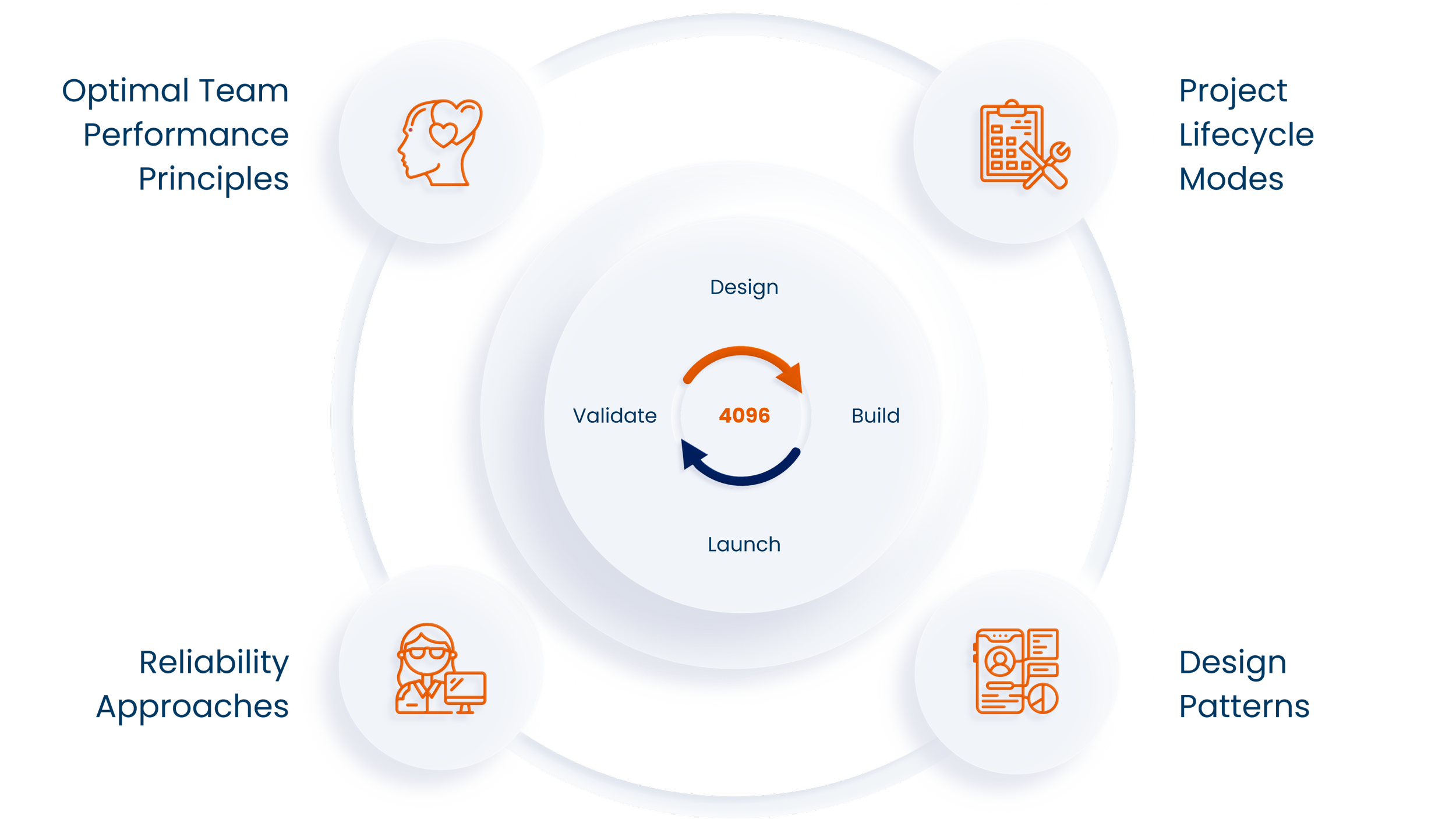
At the heart of Kepler Team's methodology is System 4096™ - a set of Kepler's proprietary software design tools providing invaluable guidance to optimize innovation and reap its benefits.
Let’s discuss your project
Send us a message, and we will get back to you as promptly as we can.